✦ Edited and fact-checked by Eric Chiu, our Tech Editor with over 10 years covering entertainment and home tech.
DIRECTV is the easiest way to watch all your football in one place
Did you know that DIRECTV is the preferred streaming service of true-blue sports fans? In fact, a staggering 97% of DIRECTV streaming subscribers reported high satisfaction with their live sports viewing experience. And if you're a rabid football fan, DIRECTV delivers more football channels than competitors, an industry-leading multiview experience, and even free ESPN Unlimited. Those are just some of the many reasons why the CableTV.com editorial staff recommends DIRECTV as the best streaming service for sports. What are you waiting for? Try DIRECTV free for five days and don't miss a single snap of your favorite football teams.
Meet the DIRECTV Gemini hardware family
DIRECTV has officially pivoted toward a “streaming-first” experience with its Gemini line. These devices act as a bridge, merging the reliability of satellite with the user experience that helped DIRECTV land a spot in our best live TV streaming services ranking.
The ecosystem currently features three distinct hardware tiers. The Genie serves as the brains for satellite users, while the DIRECTV Gemini box acts as a wired or wireless client.
DIRECTV Gemini: hybrid features and streaming integration
The DIRECTV Gemini device works by integrating live TV with third-party apps like Netflix and HBO Max into one interface. This setup aims to reduce app fatigue by bundling everyday streaming apps alongside DIRECTV directly in the menu.
If you are a satellite user, you must still have a primary Genie receiver to use a Gemini client. However, recent updates have introduced SignalSaver, which automatically switches to a streaming backup if your satellite signal drops during a storm.
Starting in 2026, these devices also feature AI-generated ads via Glance. If your screen is inactive for 10 minutes, you’ll see interactive content and QR codes on your screensaver.
DIRECTV Gemini technical specs and 4K experience
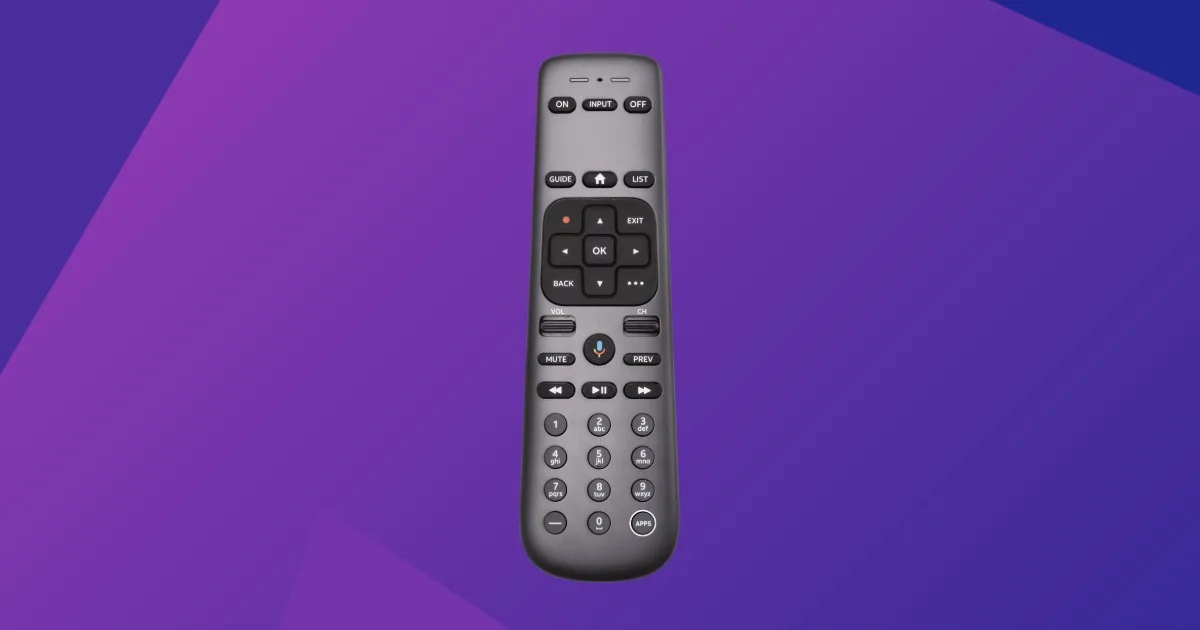
Every Gemini device supports 4K HDR for sterling picture quality and also comes with an integrated Google voice remote. While the hardware can output 4K, remember that actual 4K content is limited to specific channels and compatible third-party apps.
The remote remains the gold standard for fans because it retains a traditional channel numberpad for easy channel browsing. This makes channel surfing feel much more natural than it does on the tiny remotes you get with most live TV streaming service competitors.
One major technical shift involves storage: using Gemini with DIRECTV via your home internet grants you unlimited cloud DVR. Your recordings will expire after nine months, a significant change from the traditional 200–450-hour hardware limit.

[I use] DIRECTV streaming, but I have been satisfied with most [to] all aspects and love the Gemini feature, as I can ask for a channel and no searching [is] needed most of the time.
Understanding DIRECTV Gemini costs and ownership fees
For new customers, the first Gemini device is usually included at no extra cost. If you need hardware for additional rooms or are an existing customer upgrading, a $7 to $10 monthly TV Access Fee applies per receiver.
Be careful with your equipment if you decide to cancel your service. Non-return fees range from $45 for Minis to $135 for Gemini or Genie receivers.
While DIRECTV offers a premium experience, satellite customers still face a two-year contract. Be prepared for second-year price hikes, such as the Entertainment plan jumping from roughly $90 to $107 per month.
Our verdict: Is DIRECTV Gemini worth it?
The consensus among tech enthusiasts is that the Gemini is a love-hate device. It is perfect if you want a cable feel with a single remote that handles everything.
However, some users report interface lag when running heavy apps like Paramount+. If you prioritize a snappy interface for gaming or heavy app usage, you might prefer the DIRECTV app on a dedicated Apple TV.
Ultimately, the Gemini is the best choice for those who want the most integrated sports experience. After all, DIRECTV continues to hold its title as the best TV provider for sports enthusiasts.
DIRECTV Gemini FAQ
How do I reset my DIRECTV Gemini device?
To reset your Gemini, locate the small red reset button on the side of the device and press it once. Alternatively, you can unplug the power cable for 15 seconds and then plug it back in to perform a power cycle.
Does DIRECTV Gemini require an internet connection?
Yes, the Gemini requires a high-speed internet connection to access its smart features, third-party apps, and SignalSaver backup. While satellite users still get a signal via a dish, the interface relies on the web for TV functionality.
Can I use DIRECTV Gemini without a Genie?
If you are a satellite customer, you must have a Genie server (HR44 model or higher) as the primary hub for your Gemini client. If you are a streaming DIRECTV customer, the Gemini functions as a standalone device without a Genie.
Is there a monthly fee for the DIRECTV Gemini?
The first device is typically included for new subscribers, but additional devices or upgrades for existing customers incur a $7 to $10 monthly TV Access Fee. This fee applies to each additional room where a Gemini is installed.
Does the Gemini remote support voice commands?
Yes, the Gemini remote features an integrated Google Assistant for voice assistance. You can press the mic button to search for shows, change channels, or launch streaming apps using your voice.
