YouTube TV and DIRECTV Subscribers, Here’s How to Claim Your Settlement Money

Claims are due September 8, 2026
Live TV streaming customers, check your emails. At the end of August, you may have received an email from a “Settlement Administrator” letting you know that you may be eligible for a payout after a class action settlement. It may seem like a scam at first, but news outlets like Newsweek have reported on its legitimacy.
This opportunity is available to anyone who signed up for YouTube TV or DIRECTV’s streaming service (previously called DIRECTV Stream) any time from April 1, 2019, to March 31, 2026, even if you’ve since canceled your subscription. You’ll need the UniqueID and PIN from the settlement email, so make sure it didn’t end up in your spam box.
Interested in claiming your payout? Keep reading, and I’ll go over everything I could find about the case.
Biddle vs. The Walt Disney Company, explained
Before we go over how to claim your money, it’s important to know why this settlement happened in the first place. It’s thanks to a case called Biddle vs. The Walt Disney Company, raised by YouTube TV and DIRECTV customers. The plaintiffs alleged that Disney forced live TV streaming companies to include its channels, especially ESPN, in base TV packages, driving up prices for consumers.
One incident in question took place in October 2019, when AT&T TV (a DIRECTV streaming predecessor) increased its base package price from $50 to $65. The plaintiffs alleged that this was directly due to Disney’s carriage agreement, which it manipulated so that its own live TV alternative, Hulu + Live TV, would remain the cheaper alternative. The same thing allegedly happened two years later between Disney and YouTube TV.
If true, this would violate several antitrust and consumer-protection laws. This conversation seems particularly relevant in 2026, when Paramount Skydance is also in hot water for its possible antitrust law violations.
In this case, the Walt Disney Company denied wrongdoing, but agreed to a $50 million partial settlement anyway. Unfortunately, like all class action lawsuits, that money will be distributed among customers, meaning you personally won’t get the $50 million. You’ll get a much smaller sum, which will only be calculated after the settlement administrator determines how many customers file a claim.
To make sure you’re part of that group, keep reading, and I’ll go over the steps you’ll need to take.
Keep up with all the latest in entertainment news
Subscribe to CableTV.com's email newsletter for the latest TV event viewing guides, entertaining takes, and money-saving promotions.
By signing up, you agree to our Privacy Policy & Terms and Conditions.
How to claim your settlement money
The first thing you’ll need to claim your settlement money is the original email from “Settlement Administrator.” That email has two numbers, a UniqueID and a PIN, that you’ll need to file your claim.
The second thing you should do is check that it’s not too late. This opportunity will expire on September 8, so there are only a few days left to file. If it’s past the deadline, you won’t be able to claim a payout this time. But keep an eye on the headlines in the future — there may be other class action settlements that could benefit you.
(If you want to keep up with CableTV.com news, feel free to add your email to the email subscription widget up above. If you don’t see it, your ad blocker may be hiding it. That’s okay, we’ll try not to be offended.)
But if the deadline has not yet passed, your next step is to head to the settlement website. Enter your Unique ID and PIN in the form, and then submit. You’ll see a form where you can input your first and last name, mailing address, and email address. You’ll also have to confirm which states you lived in from 2019–2026 and which services you subscribed to.
Then you’ll confirm how long you were subscribed to YouTube TV, DIRECTV, or both. This is the last step before confirming a payment method — you don’t have to submit any proof that you were a subscriber or for how long.
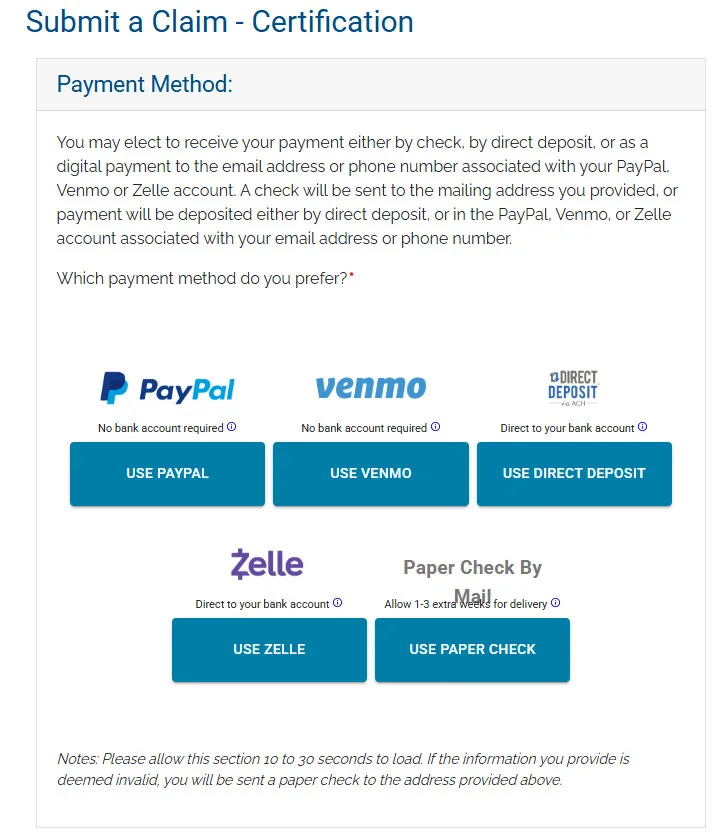
You’ll have the option to claim your payment through PayPal, Venmo, Zelle, direct deposit, or a paper check by mail. It’s never a good idea to submit your private banking information to an unknown online source, even if news outlets like us say it’s safe. Even the most well-meaning databases get hacked all the time. So I wouldn’t recommend using Zelle or direct deposit for this.
The safest payout method is probably a paper check, although you’ll have to wait 1–3 extra weeks for delivery. That way, no one has the opportunity to exploit your banking details. If you’re comfortable using PayPal or Venmo, you could use those instead.
Then all you have to do is check the final box and hit submit.
In this article

YouTube TV is a fantastic option if you’re looking for a streaming alternative to cable (even if you end up with a few channels you don’t want).

DIRECTV is a satellite TV provider, but it also offers its own streaming TV alternative. Give its packages a look, because there might be an option that works for your household.

Hulu + Live TV is often a cheaper alternative to its competitors, although its price has increased over the years. You’ll also get the benefit of the full Disney Bundle at no additional charge.
Who we are
At CableTV.com, we’re not just entertainment experts — we’re also fans just like you. So while our first priority is reporting the best and most accurate information about TV providers and streaming services, we also love talking about our favorite shows and movies. So you can count on us to share our honest opinions and unbridled enthusiasm. For more on our process, check out our Editorial Policy.
